What is an "Account?"
For billing purposes, an account is an individual data set within a connected data source (such as a Page, Channel, Property, or Ad Account) for which you create reports in PMA.
You are not alone in asking. We get this question a
lot! It is confusing because for each connector, it may be called something different.
What an account is
In Facebook Insights, an account is your Page.
For YouTube Analytics, a Channel is an account.
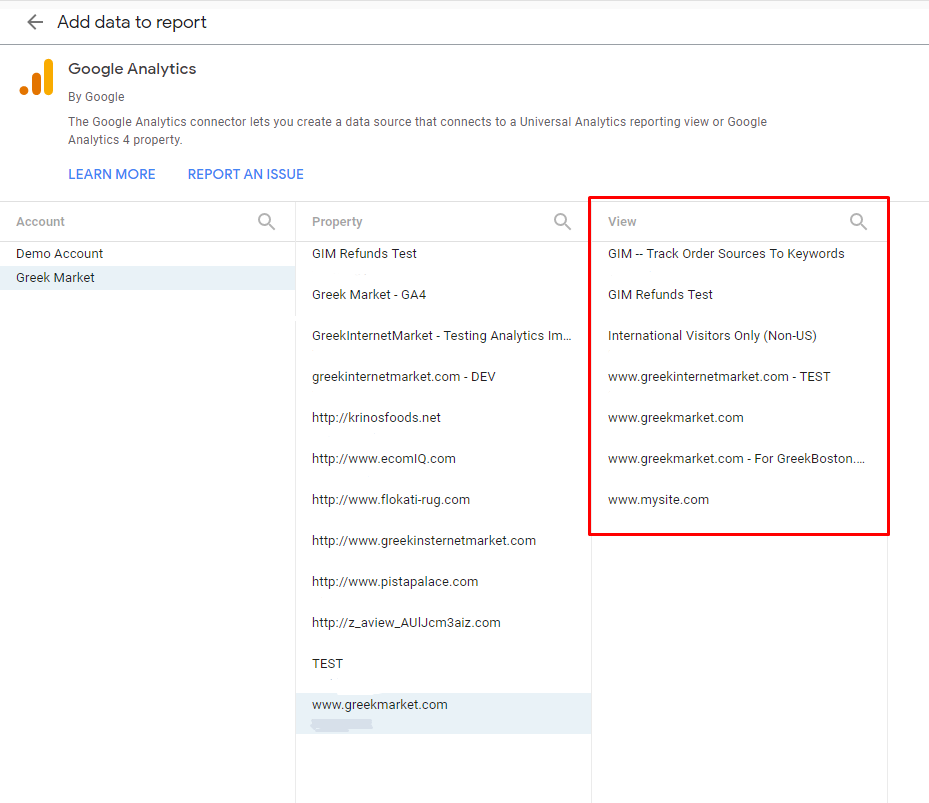
For Google Analytics, it can be different. In Universal Analytics, a View is an account.
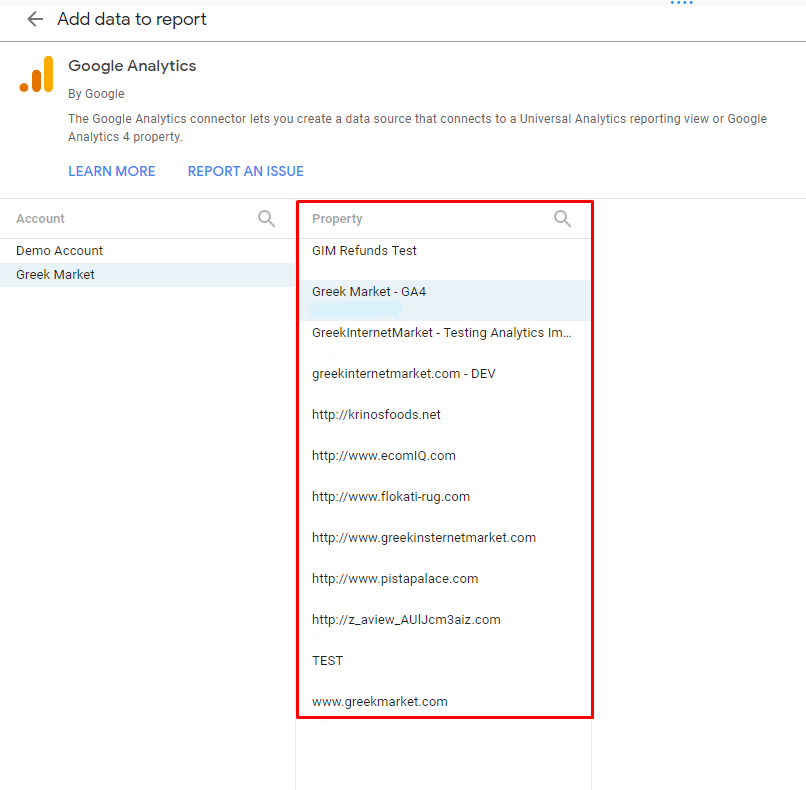
But in GA4, an account is a Property .
And in Microsoft Ads, an Account is an account.
What an account is not
This can sometimes be even
more
confusing because the login you use at your data source may be called an "account" but it will not be billed that way.
A Facebook Ads business manager login is not an account. In this case, an Ad Account is an account.
An MCC login for Google Ads is not an account. In this case, an Account is an account.
How accounts affect your bill
Now that you know what counts as an account, here is how accounts factor into your PMA billing. Each plan includes a set number of accounts, and enabling more than your plan includes will result in addon charges on your bill. These charges begin when an account is connected, not when it is first used, so an account you add and never report on still counts. See When Does Adding an Account Affect My Bill? for how and when your bill changes.
- Business plan: Includes 5 accounts total, shared across all of your connected data sources. For example, you could have 5 data sources with 1 account each, or 1 data source with 5 accounts. Each additional account beyond 5 is billed at $14.95/month.
- Grow plan: Includes 7 accounts per source. You can connect unlimited data sources, each with up to 7 accounts.
- Pro plan: Includes 20 accounts per source. You can connect unlimited data sources, each with up to 20 accounts, at no extra charge. If any connector exceeds 20 accounts, overage charges apply based on volume pricing.
- Custom plan: Account quotas and pricing are customized based on your needs.

Pro plan account overages: On the Pro plan, overage charges are based on your single highest-count connector (whichever data source has the most accounts determines the number of additional accounts billed for your hub). Only the accounts exceeding the included 20 in that one connector are counted as overages.
Example: If your hub has 24 Facebook Ads ad accounts, 10 Google Ads accounts, and 7 GA4 properties, the overage is based solely on the Facebook Ads connector: 24 minus the 20 included = 4 additional accounts billed. The Google Ads and GA4 connectors do not add to the overage because neither exceeds the highest-count connector.
For full pricing details and volume pricing tiers, see Billing Basics and Best Practices.
Example: If your hub has 24 Facebook Ads ad accounts, 10 Google Ads accounts, and 7 GA4 properties, the overage is based solely on the Facebook Ads connector: 24 minus the 20 included = 4 additional accounts billed. The Google Ads and GA4 connectors do not add to the overage because neither exceeds the highest-count connector.
For full pricing details and volume pricing tiers, see Billing Basics and Best Practices.
Still Have Questions?
No worries, we're happy to help!